SquadBearCLOCK
WalletTomasz Wójcik
Rotates in 4:12
Four buttons for the day. Expected hours already know leave. A lobby tablet writes the same punches. Managers only see the exceptions - not a map of where anyone went.
Which attendance entries need a review?See your agent at work

A working-time record people will actually keep - and a manager can defend.
Clock in, Take a break, Resume work, Clock out. The Clock screen changes with the shift. Times are the server's, so a wrong phone clock cannot rewrite the day.
Attendance · Clock

Product Engineer · Tue 27 Jan
Working
Started at 09:00
Assigned work schedule
Expected time comes from the work schedule minus approved leave. A public holiday is zero. There is no late flag - a schedule is a daily duration, not a 09:00 start.
Attendance · Clock · Fri 24 Jul
A public holiday is zero. No late flag.
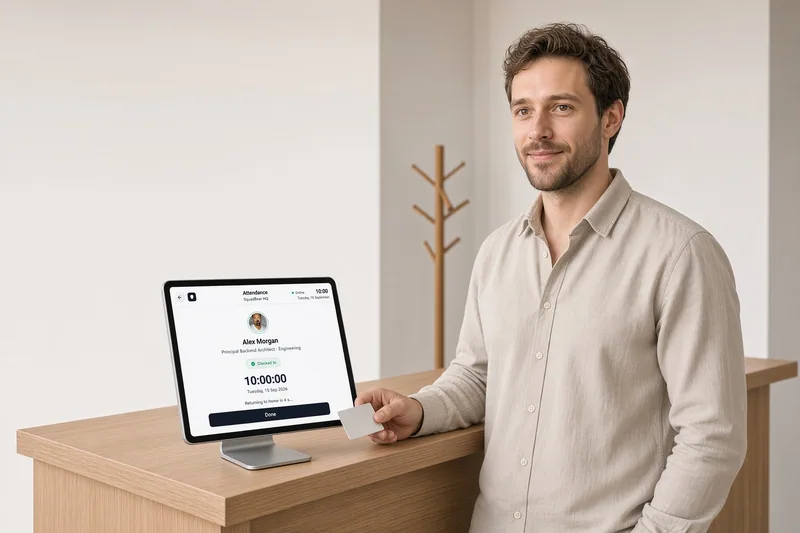
Pair a kiosk in Workspace settings. People tap a card or hold up a rotating badge from Clock. Offline punches queue and keep the time they were tapped. Same punches as the laptop clock. No GPS, no webcam, no iBeacon.
Kiosk · Building A lobby

Card ending · 84F2
Offline mode · Punch queued (07:58)
Clock · Show my badge
Tomasz Wójcik
Rotates in 4:12
Forgot to clock out? The shift auto-closes and lands in Attendance review. Short days, missed breaks, work on leave. People request a correction with a reason, and a manager approves it as asked or with changes. Nobody edits a punch - the originals stay, and the record keeps before and after.
Attendance · Review
Friday 23 January
Tomasz: “Forgot to clock out.”

“We finished the release at 17:45.”
Live presence is Working, On break or Not in for the people you manage. It does not infer lateness, and it does not know where anyone is.
Attendance · Live presence
Platform · current shift projection
2 Working1 On break1 Not in
Since 09:00

Since 15:00
On approved leave
Since 08:30
Four buttons beat a portal. The habit sticks.
Punches are never rewritten. Corrections have a trail.
A kiosk writes the same punches Clock does.
The queue is exceptions and corrections, not every punch.
Plain language in, the right thing done - correctly, and always within your rules. Here's a real example.
Show me every attendance review item still open in Platform, oldest first, and say which ones are short days.
list_attendance_review{ "status": "open", "teamId": "team_platform" }list_team_presence{ "teamId": "team_platform", "state": "on_clock" }No. Attendance records presence - in, break, out. Time tracking records hours against a project. Either runs without the other. When both are on, My time can show an attendance strip for today; clocking out never writes a time entry.
No GPS, no geofence, no webcam, no iBeacon, no keystrokes. Clock is on the phone or laptop. A kiosk is a shared tablet that reads a card or a rotating badge.
An open shift past the stale threshold closes on its own and opens one review item. A manager fixes the end in that item, or the employee sends a correction request, which a manager approves, approves with changes or rejects.
No. Attendance ships as its own module. Kiosk sits under it and stays off until you turn it on. Laptop and phone Clock work without a tablet.
No. It stores worked, break and expected minutes. Export a CSV from My attendance, or read shifts through the API or an agent. Payroll stays in the system you already run.
Yes, if Attendance is on. /clock in, out, break, resume, or status. The punch is the same record as Clock in the app. Discord does not clock yet.
Yes. Several attendance policies at once, bound to a person, a team or a country. Breaks, short-day tolerance, over-schedule threshold, and whether leave warns or blocks at clock-in.
Leave, time, attendance, team health, performance reviews and the employee record work as one, so the picture is always joined up - a booked holiday is known everywhere, a new hire's day one starts itself, and a quiet team never slips through.
When booking leave is effortless, people actually rest, managers stop firefighting, and you always know where the business stands.
Time tracking only matters when it's honest and effortless.
Great teams quietly drift long before they visibly break.
The moment someone is hired, their record exists, their onboarding tasks have owners and dates, and the policies that need signing find them by themselves.
One cycle says who is reviewed and which form they answer.
SquadBear is the system of record.
Practical guides on policies, edge cases and rollouts - for HR leads, founders and managers running modern teams.
A lobby kiosk is an attendance record that must work offline. Why device time is trusted, why a QR badge should expire, and where to get the Android app.
Read the guide →How software houses with employees and B2B contractors keep leave, hours, payroll exports and ISO 27001 policies in one workspace without blurring contracts.
Read the guide →SquadBear is available in the Gemini app and on the Gemini website. Connect once, then ask about timesheets, team health, and leave.
Read the guide →Let your assistant handle routine leave, time and HR admin. Make room for the conversations and support your team needs.